




Philips DVT2050 Voice Tracer (Audio Recorder)
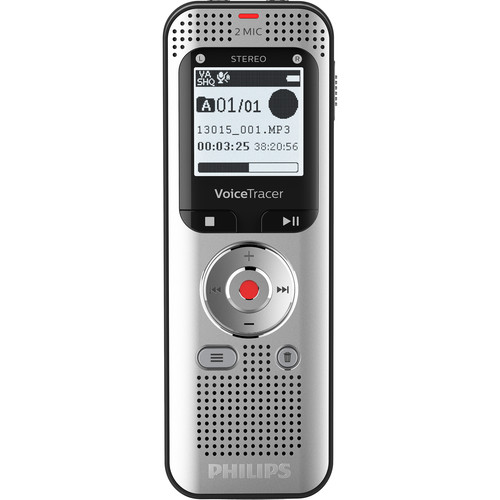
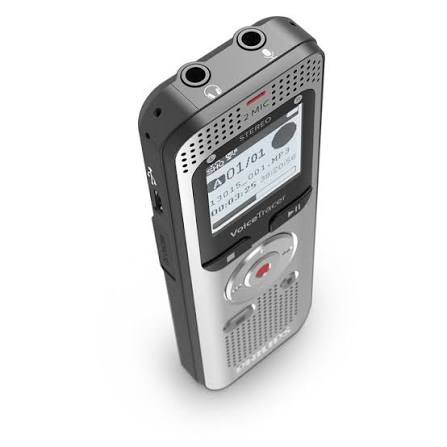
The Philips DVT2050 Voice Tracer (Audio Recorder) is a premium, portable digital audio recorder designed for exceptional voice clarity. It serves as a dedicated, high-performance alternative to smartphone recording, making it a top choice for professionals, students, and content creators who require reliable audio capture

Core Features of the Philips DVT2050
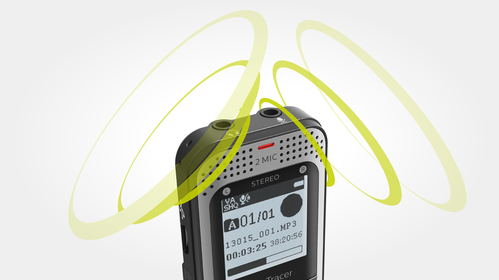
- Dual-Microphone Stereo System: Two built-in high-sensitivity microphones capture crisp, clear stereo sound while minimizing background noise.
- 8 GB Internal Memory: Holds up to 2,370 hours of audio, with an expandable microSD card slot supporting up to an additional 32 GB.
- Lossless PCM & MP3 Recording: Records in uncompressed PCM (WAV) format for CD-quality audio, or standard MP3 format for effortless file sharing.
- Ultra-Long Battery Life: The integrated 1300 mAh rechargeable Li-polymer battery delivers up to 50 hours of continuous recording on a single charge.
- Plug-and-Play Connectivity: Connects instantly to Windows or macOS via a high-speed micro-USB cable without requiring extra software.
- FM Radio & Recording: Philips DVT2050 Voice Tracer (Audio Recorder) features an auto-tuning digital FM radio, allowing you to listen to and directly record live radio broadcasts.
- Voice-Activated Recording: Automatically starts recording when you begin speaking and pauses when you stop, saving battery and storage space.
Practical Uses and Applications
- Lectures and Classes: Students can capture clear audio from the back of a lecture hall, making it perfect for later review and study notes using Philips DVT2050 Voice Tracer (Audio Recorder).
- Interviews and Journalism: Media professionals use it to document interviews with precise voice accuracy for exact transcriptions.
- Business Meetings and Conferences: Businesses rely on it to log minutes, document group discussions, and archive important board meetings.
- Podcasting and Voice-Overs: Content creators use the lossless PCM mode to capture high-fidelity vocal tracks for digital media production.
- Audio Diarists & Creators: Writers and researchers can quickly dictate thoughts, hooks, book ideas, or daily reminders on the go.

Method of Usage: How to Operate the DVT2050
1. Charging and Powering On
- Connect the micro-USB cable to the recorder and a power source to charge the internal battery.
- Slide the Power/Hold switch down on the side of the device to turn it on.
2. Starting a Recording
- Aim the top microphones toward the sound source.
- Press the red Record (REC) button to start recording immediately. The status LED will turn red.
- Press the Pause button to halt recording temporarily, and press it again to resume in the same file.
- Press the Stop button to save the audio file securely.
3. Playing Back Your Audio
- Use the Up/Down arrows or file navigation buttons to select your recorded track.
- Press the Play/Pause button to listen through the built-in 28 mm speaker or connected headphones.
- Adjust the volume using the + / – volume control buttons.
4. Transferring Files to a Computer
- Connect the recorder to your PC or Mac using the provided micro-USB cable.
- The device will appear on your desktop or file explorer as an external drive (like a USB flash drive).
- Open the drive, navigate to the recording folder, and drag-and-drop the MP3 or WAV files onto your computer for editing, sharing, or transcription.

 Overview

| Weight | 0.0 lbs |
|---|
Processor

| Weight | 0.0 lbs |
|---|
Display

| Weight | 0.0 lbs |
|---|
RAM

| Weight | 0.0 lbs |
|---|
Storage

| Weight | 0.0 lbs |
|---|
Video Card

| Weight | 0.0 lbs |
|---|
Connectivity

| Weight | 0.0 lbs |
|---|
Features

| Weight | 0.0 lbs |
|---|
Battery

| Weight | 0.0 lbs |
|---|
General

| Weight | 0.0 lbs |
|---|
Philips DVT2050 Voice Tracer (Audio Recorder)
The Philips DVT2050 Voice Tracer (Audio Recorder) is a premium, portable digital audio recorder designed for exceptional voice clarity. It serves as a dedicated, high-performance alternative to smartphone recording, making it a top choice for professionals, students, and content creators who require reliable audio capture
Core Features of the Philips DVT2050
- Dual-Microphone Stereo System: Two built-in high-sensitivity microphones capture crisp, clear stereo sound while minimizing background noise.
- 8 GB Internal Memory: Holds up to 2,370 hours of audio, with an expandable microSD card slot supporting up to an additional 32 GB.
- Lossless PCM & MP3 Recording: Records in uncompressed PCM (WAV) format for CD-quality audio, or standard MP3 format for effortless file sharing.
- Ultra-Long Battery Life: The integrated 1300 mAh rechargeable Li-polymer battery delivers up to 50 hours of continuous recording on a single charge.
- Plug-and-Play Connectivity: Connects instantly to Windows or macOS via a high-speed micro-USB cable without requiring extra software.
- FM Radio & Recording: Philips DVT2050 Voice Tracer (Audio Recorder) features an auto-tuning digital FM radio, allowing you to listen to and directly record live radio broadcasts.
- Voice-Activated Recording: Automatically starts recording when you begin speaking and pauses when you stop, saving battery and storage space.
Practical Uses and Applications
- Lectures and Classes: Students can capture clear audio from the back of a lecture hall, making it perfect for later review and study notes using Philips DVT2050 Voice Tracer (Audio Recorder).
- Interviews and Journalism: Media professionals use it to document interviews with precise voice accuracy for exact transcriptions.
- Business Meetings and Conferences: Businesses rely on it to log minutes, document group discussions, and archive important board meetings.
- Podcasting and Voice-Overs: Content creators use the lossless PCM mode to capture high-fidelity vocal tracks for digital media production.
- Audio Diarists & Creators: Writers and researchers can quickly dictate thoughts, hooks, book ideas, or daily reminders on the go.
Method of Usage: How to Operate the DVT2050
1. Charging and Powering On
- Connect the micro-USB cable to the recorder and a power source to charge the internal battery.
- Slide the Power/Hold switch down on the side of the device to turn it on.
2. Starting a Recording
- Aim the top microphones toward the sound source.
- Press the red Record (REC) button to start recording immediately. The status LED will turn red.
- Press the Pause button to halt recording temporarily, and press it again to resume in the same file.
- Press the Stop button to save the audio file securely.
3. Playing Back Your Audio
- Use the Up/Down arrows or file navigation buttons to select your recorded track.
- Press the Play/Pause button to listen through the built-in 28 mm speaker or connected headphones.
- Adjust the volume using the + / – volume control buttons.
4. Transferring Files to a Computer
- Connect the recorder to your PC or Mac using the provided micro-USB cable.
- The device will appear on your desktop or file explorer as an external drive (like a USB flash drive).
- Open the drive, navigate to the recording folder, and drag-and-drop the MP3 or WAV files onto your computer for editing, sharing, or transcription.


Reviews
Clear filtersThere are no reviews yet.